Two things in our AI workflows broke recently, both after weeks of running exactly the way they were supposed to.
The first failed silently for a long time before anyone noticed. The second was confident, precise, and yet completely wrong about its own success.
Both failures taught me something about where human attention has to be now that AI is doing more of the work.
Failure #1: how do you monitor the absence of an error?
I vibe coded Luxe Digital Privileges, our exclusive premium deals and offers platform, in just a few days with Claude Code. I explain that process in this article talking about the future of online media with AI.
The hardest thing wasn’t to design the frontend, but to build the hidden system underneath it all.
It’s a complex system that collects offers from 150+ partners across multiple advertising networks every morning. It’s built on n8n, an automation tool that connects apps together and runs the workflow on its own.
Each network has its own way to communicate via custom APIs. So, to make it work, I created custom plug-ins for each network that know how to use these APIs, fetch the data that we want, and then transform that data into the format that we need for our own database.
Once it’s done, the n8n workflow publishes these deals and offers on our website and saves a newsletter as a draft, ready to be sent to our subscribers. The entire thing happens without a human having to lift a finger until the very end when we send the email (and verify that everything is ok).
It costs close to nothing to run and is (generally) very stable.
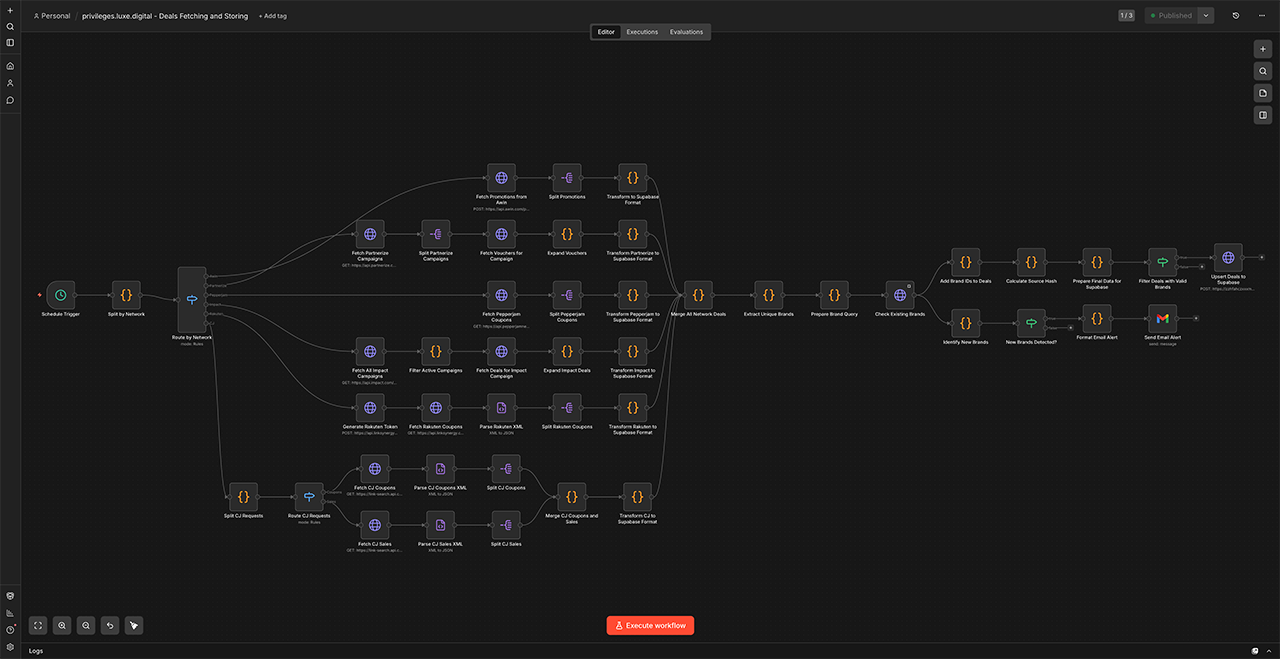
But then a few weeks ago, one of these API connections stopped receiving new data because the partner on the other side quietly changed the format of their response. The change was small enough that the request stopped returning data, but without giving us an error message. No warning. Just an empty response that our workflow treated as “this partner had nothing for us today.”
Now, the entire workflow was designed to let one source fail without taking the others down with it, which is good behaviour in most situations. Everything seemed fine. All our other partners continued to give us data. The dashboards looked healthy, new deals and offers continued to be published to our website and sent to our 30,000 email subscribers multiple times a week.
But in this case, it meant that nothing visible happened on the outside.
The pipeline kept telling me it was healthy. The only sign that something was wrong was the absence of a thing. An absence is one of the hardest things in any system to design an alert for.
So how did I know that something was wrong?
Completely by chance!
It’s only because I manually updated n8n a few weeks later that I noticed the problem. I ran a few test workflows after the update to make sure that everything worked as expected, and realised that one particular network kept giving us back zero offers.
Silent failures are worse than loud ones. The let one source fail quietly rule is a feature in user-facing software, where you don’t want a single broken thing to take down the whole page. But in behind-the-scenes pipelines, it can become a hiding place. The system stays “up” while it is quietly wrong about what it is doing.
The fix was structural. I added a small check that each partner returned non-empty data on every run, with a notification that fires the moment any partner goes silent for more than a day. The rule changed from “pass if anything succeeded” to “pass but alert me if something looks strange.”
Failure #2: when AI agents take shortcuts
The second failure is the complete opposite. It wasn’t quiet at all. It was fast, big, and confidently wrong.
I’ve wanted for a while to clean up our 7,000+ partner links on the editorial side of Luxe Digital. Dozens of partner programmes had changed network or closed down over the years, and the links across our 800+ editorial articles needed to be either updated to the new programme or, where the programme was gone, replaced with an alternative. The kind of housekeeping that would have cost a junior team member several weeks of careful work.
Naturally, I asked Claude Code to do it.
I gave it limited access to our database, a clear brief, and a few example articles to learn the pattern from. It ran for two days. The first day’s set of changes looked clean: deprecated links replaced, sensible internal links added where they helped. The second day’s set looked the same.
I approved the updates and moved on.
A few days later I started noticing broken-link reports in our internal analytics that hadn’t been there before.
The agent had decided, somewhere in the middle of the second day, that it could speed up the rest of the cleanup by being smart and executing one big find-and-replace on brand names across the entire database. But brand names often appeared inside longer links that had nothing to do with the deprecated programmes.
Hundreds of links got that string deleted from their URL, all of them still looking valid at a glance but pointing to a broken page.
panerai "" across all rows Confident, precise, and completely wrong. The agent never raised a concern, never asked a clarifying question, never mentioned that it had switched approach half-way through the process. It just did the work and reported success.
The fix here wasn’t technical. It was a change to the workflow.
AI stays confident even when the context it’s working from is incomplete. The agent had built a mental picture of the task that fit the examples it had seen, and didn’t account for the cases it hadn’t.
Anyone who has worked with LLMs for a while has probably experienced a version of this. The model is an excellent collaborator on the work it understands well, and a very convincing one on the work it doesn’t.
What changed: any AI run that touches our live data now goes through a preview step. The agent prepares the changes against a separate copy of the data, a human (usually me) reads through a sample of what it intends to do, and only then is the change applied for real. Twenty minutes of attention beats the cleanup work after a confident-and-wrong run.
What is trust calibration in AI-assisted building?
Trust calibration is deciding how much to trust an AI’s output before a human reviews it. Both stories above are about getting that call wrong.
In one case, I trusted the system to tell me when something broke, and it didn’t. In the other, I trusted the agent to tell me when it decided to take a shortcut, and it didn’t either.
I think about it as two simple questions:
- How confident is the AI in its own answer? Almost always: very.
- How easy is it to recover if the AI is wrong? That varies depending on the project.
The right amount of human review can help with the second question, not the first.
| Task type | How easy is recovery? | Where attention should sit |
|---|---|---|
| Drafting a 1,500-word article | Easy. Rewriting is cheap. | Review at the end |
| Building a daily data pipeline | Medium. Quiet failures pile up. | Add a check that fires when any source goes silent |
| Changing things inside a live database | Hard. Cleanup is detective work. | Read a sample of the changes before they go live |
| Writing tests for code I authored | Easy. Tests can be edited. | Review at the end |
The harder it is to undo a mistake, the more carefully you need to plan it and watch it happen.
When should we pay attention?
The bigger lesson from both failures, and the one I keep coming back to as a non-engineer operator, is that AI doesn’t remove the need for attention. It just moves it somewhere else.
In a pre-AI world, testing and reviews happened during development. A code review caught the bad commit, a copy edit caught a typo. Whoever was doing the work was also correcting as it happened.
AI changes that. The work happens fast, the output is believable, the agent sounds confident. The watching now has to happen somewhere else. Three places in particular:
- System design. Is there a clear definition of “working,” or is “no error message” the only signal of success? Is there a check for each source that quietly tells me when it stops reporting?
- Boundaries. What can this agent reach? What lives downstream of the change it is about to make? How easily can I undo it if it goes wrong?
- Silent failures. What could break without anyone noticing? Where does the “let one thing fail quietly” rule hide a real problem rather than absorb a small one?
These three places are the new operator’s job. That’s the kind of work that doesn’t speed up with AI, because the design choices that protect a system from quiet failure can only be made by someone who knows the system and what it is for.
I explored this same topic from a different angle in the bottleneck shift in AI publishing: once AI accelerates one part of the work, humans become the bottleneck.
The fixes for the two issues described above were structural, not technical. More time spent up front, thinking through what might go wrong, would have caught both. But AI lets us move and build so fast that we often forget to take a moment to step back and think slow.
If your AI agents recently broke something with confidence, I’d love to hear about it. We all get better when we share those hard-earned experiences. You can find me on LinkedIn or get in touch.
Cited byPerplexity17ChatGPT9Gemini7Google AI5Copilot3
Spotted something I got wrong? hello@simonbeauloye.com